Technical Interview Scorecard Template: How to Score Candidates Consistently
Use this interview scorecard template to rate technical candidates on the same criteria, record evidence, and compare them fairly. Copy-ready table included.
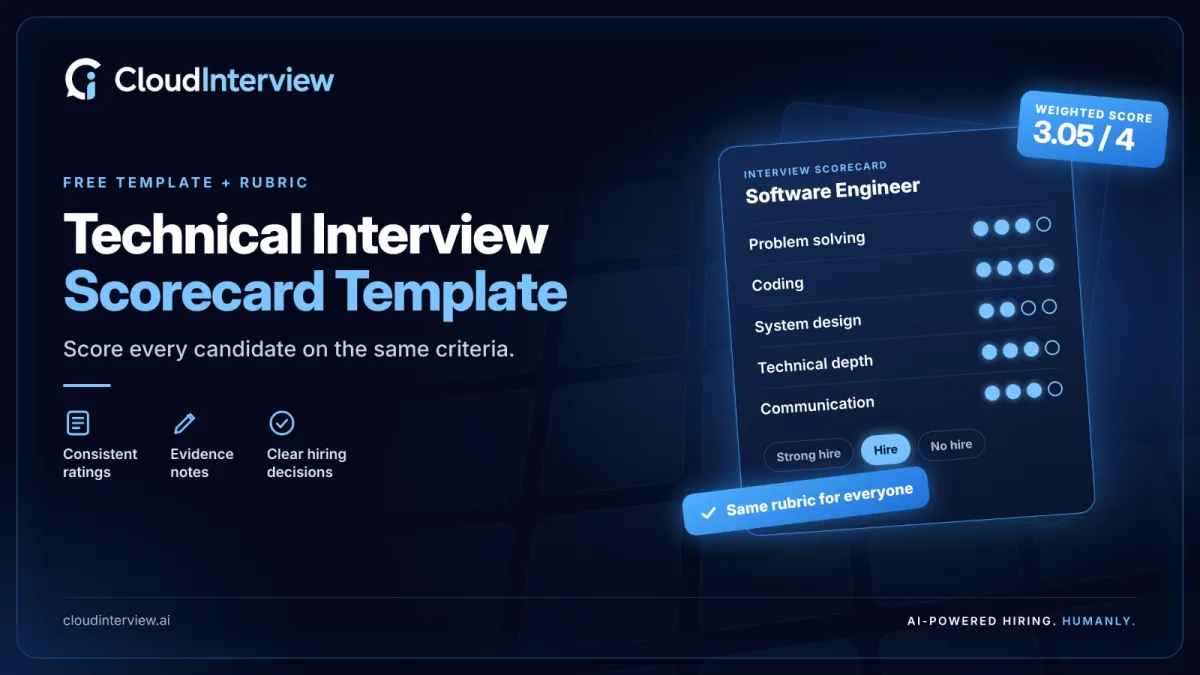
An interview scorecard template is a reusable form that lists the skills a role requires, a fixed rating scale, and space for evidence, so every interviewer rates every candidate on the same criteria. This guide gives you a technical interview scorecard you can copy, a four-level rubric that defines each rating, and a six-step process for using it.
Most technical hiring loops break at the same point. Three interviewers leave three different rounds with three different impressions, and the debrief becomes a debate about who argued best. A scorecard replaces impressions with ratings and written evidence that can be compared.
Key points
- An interview scorecard records a rating and written evidence for each skill a role requires.
- •A technical interview scorecard uses four to six competencies, such as problem solving, coding and system design.
- A four-level rubric defines what each rating means, with the hiring bar between 2 and 3.
- Interviewers score independently first, then compare ratings in the debrief.
- The weighted score is for comparing candidates. The evidence notes are for making the decision.
In this guide
- What an interview scorecard is
- What makes a technical interview scorecard different
- Why scorecards improve hiring decisions
- What to include, with a copy-ready template
- worked scoring example
- How to adapt the scorecard for different technical roles
- Example interview questions for each competency
- The rating scale and what each score means
- How to use the scorecard in six steps
- Manual and AI-assisted scoring compared
- Frequently asked questions
What Is an Interview Scorecard?
An interview scorecard is a structured form that an interviewer completes for each candidate, recording a rating and supporting evidence for each job-relevant skill. It is also called an interview evaluation form or interview score sheet.
A scorecard has three jobs. It tells the interviewer what to assess before the interview starts. It captures what the candidate actually said or did. And it gives the hiring team a common format, so two candidates interviewed by different people can be compared side by side.
The scorecard is the recording tool of a structured interview. A structured interview asks every candidate for the same role the same core questions and rates the answers against the same standard.
What Makes a Technical Interview Scorecard Different?
A technical interview scorecard is an interview scorecard built for engineering, data, cloud, security and similar roles, where the candidate produces work during the interview. It rates the work as well as the conversation.
That changes what the form has to capture:
- Problem solving: how the candidate breaks down an unfamiliar problem, including the questions they ask first.
- Coding and data structures: correctness, readability, and choice of approach.
- System design: trade-offs, scale, and failure handling for the level of the role.
- Technical depth: how well they understand the tools they say they have used.
- Communication: whether they explain their reasoning clearly enough for a team to work with.
A general scorecard might rate “technical skills” in one row. A technical scorecard splits that row into separate competencies, because a candidate can be strong at coding and weak at design, and the hiring team needs to see both.
Why Do Interview Scorecards Improve Hiring Decisions?
Scorecards improve hiring decisions because they make interviews structured, and structured interviews predict job performance better than unstructured ones. A 2022 meta-analysis in the Journal of Applied Psychology by Sackett, Zhang, Berry and Lievens found that structured interviews were the strongest predictor of job performance among the selection methods studied, with a mean validity of .42.
The US Office of Personnel Management describes structured interviews as among the most valid assessment tools available, with relatively low adverse impact compared with other assessment tools when designed and used correctly.
In practice, a scorecard delivers four things:
- Consistency: every candidate is rated on the same competencies.
- Evidence: ratings come with notes, so a decision can be explained later.
- Faster debriefs: the team discusses differences in ratings instead of retelling each interview.
- Job relevance: the criteria come from the role. The US Equal Employment Opportunity Commission advises that selection procedures be job-related and properly validated for the position.
What Should a Technical Interview Scorecard Include?
A technical interview scorecard should include six parts: role details, competencies, a rating scale, evidence notes, an overall recommendation, and interviewer details.
|
Part |
What it records |
Why it matters |
|
Role details |
Job title, level, interview stage |
Sets the standard the candidate is rated against |
|
Competencies |
Four to six skills the role needs |
Keeps the interview on job-relevant ground |
|
Rating scale |
A fixed scale, such as 1 to 4 |
Makes ratings comparable across interviewers |
|
Evidence notes |
What the candidate said or did |
Lets someone who was not in the room understand the rating |
|
Recommendation |
Strong hire, hire, no hire, strong no hire |
Forces a clear position before the debrief |
|
Interviewer details |
Name, date, interview type |
Creates a record for audit and calibration |
Technical Interview Scorecard Template
Copy the table below into a document or spreadsheet. The competencies and weights are an example for a mid-level software engineer; change both to fit your role.
|
Competency |
What to look for |
Weight |
Rating (1–4) |
Evidence notes |
|
Problem solving |
Clarifies requirements, breaks the problem down, tests assumptions |
25% |
|
|
|
Coding and data structures |
Working solution, readable code, sensible choice of structures |
25% |
|
|
|
System design |
Handles scale and failure, explains trade-offs |
20% |
|
|
|
Technical depth |
Explains how and why their past tools and decisions worked |
15% |
|
|
|
Communication |
Explains reasoning clearly, responds well to hints and feedback |
15% |
|
|
Overall recommendation: Strong hire / Hire / No hire / Strong no hire
Summary notes: two or three sentences on the main strengths, the main concerns, and anything the next interviewer should probe.
To get a weighted score, multiply each rating by its weight and add the results. A candidate rated 3, 4, 2, 3 and 3 on the rows above scores 3.05 out of 4. Use the number to compare candidates, and the notes to decide.
A Worked Scoring Example
Here is the weighted score for that candidate, row by row.
|
Competency |
Weight |
Rating |
Weight × rating |
|
Problem solving |
25% |
3 |
0.75 |
|
Coding and data structures |
25% |
4 |
1.00 |
|
System design |
20% |
2 |
0.40 |
|
Technical depth |
15% |
3 |
0.45 |
|
Communication |
15% |
3 |
0.45 |
|
Weighted score |
100% |
|
3.05 out of 4 |
The total hides something the rows show: this candidate is below the bar on system design. Agree your pass rule before interviews start. A common approach is a minimum overall score plus no rating below 2 on a competency the role depends on.
How Do You Adapt the Scorecard for Different Technical Roles?
Keep the structure and change the competencies and weights to match the role. Use this table as a starting point.
|
Role |
Weight more heavily |
Weight less heavily |
Competency to add or swap in |
|
Backend engineer |
System design, coding |
|
API design and data modelling |
|
Frontend engineer |
Coding, communication |
System design |
UI architecture, accessibility and performance |
|
Data engineer or analyst |
Technical depth |
System design |
SQL, data modelling and data quality |
|
DevOps or cloud engineer |
System design |
Coding and data structures |
Reliability, incident response and infrastructure as code |
|
Security engineer |
Technical depth, problem solving |
Coding and data structures |
Threat modelling and secure design review |
|
Senior or staff engineer |
System design, communication |
Coding and data structures |
Technical leadership and mentoring |
Whatever you change, keep the total at four to six competencies and make the weights add up to 100%.
Example Interview Questions for Each Competency
Each question on your interview plan should map to one row of the scorecard. These examples show the pattern.
|
Competency |
Example question or task |
What to listen for |
|
Problem solving |
“We need to cut checkout errors. What would you ask before you start?” |
Clarifying questions, stated assumptions, a plan before a solution |
|
Coding and data structures |
“Write a function that returns the ten most frequent items in a list.” |
A working solution, edge cases handled, code another engineer could read |
|
System design |
“Design a URL shortener that serves 10,000 requests a second.” |
Trade-offs explained, a plan for scale, what happens when a part fails |
|
Technical depth |
“Tell me about a technical decision you would now make differently.” |
Specific detail, the reasoning at the time, what they learned |
|
Communication |
“Walk me through your solution as if I had just joined the team.” |
Clear structure, the right level of detail, response to follow-up questions |
Ask every candidate for the role the same core questions. That is what makes their scorecards comparable.
What Does Each Score Mean? The Interview Rubric
An interview rubric is the set of written definitions that says what each rating level means for each competency. Without a rubric, one interviewer’s 3 is another interviewer’s 2.
OPM’s guidance on structured interview rating scales follows the same logic: decide how many proficiency levels you want, then write behavioral examples for each level, with input from people who know the job.
|
Score |
Level |
General definition |
Example for system design |
|
4 |
Exceeds the bar |
Handles the task independently and goes beyond what was asked |
Proposes a design, names its limits unprompted, and compares two alternatives |
|
3 |
Meets the bar |
Completes the task with minor gaps or light prompting |
Reaches a workable design and explains trade-offs when asked |
|
2 |
Below the bar |
Completes part of the task and needs significant help |
Design works for the simple case and misses scale or failure handling |
|
1 |
Well below the bar |
Cannot complete the task, even with help |
Cannot describe the main components or how they connect |
A four-level scale has no neutral middle, so the interviewer has to decide whether the candidate met the bar. Write one example row like the one above for every competency on your scorecard.
How Do You Use an Interview Scorecard? Six Steps
Use the scorecard before, during and after the interview, in this order.
- Define the competencies. Take four to six skills from the job requirements. If a skill is not needed in the role, leave it off.
- Write the rubric. Describe what each score looks like for each competency, using real examples from your team’s work.
- Map questions to competencies. Assign each question or task to the row it tests, and each interviewer to the rows they cover.
- Take evidence notes during the interview. Write what the candidate said and did. Leave the ratings until the end.
- Score independently. Each interviewer submits ratings and a recommendation before seeing anyone else’s.
- Calibrate and decide. In the debrief, discuss the rows where ratings differ, then make the hiring decision.
What Are the Common Mistakes With Interview Scorecards?
The most common mistake is filling in the scorecard from memory hours later, which turns evidence back into impressions. Four others come up often:
- Too many competencies. Past six rows, interviewers rush and rate everything the same.
- Ratings without notes. A bare number cannot be checked or challenged.
- Sharing scores before submitting. The first opinion voiced pulls the others toward it.
- One scorecard for every role. A backend engineer and a data analyst need different rows and weights.
Manual vs AI-Assisted Interview Scoring
Manual scoring means a human interviewer fills in the scorecard. AI-assisted scoring means software records the interview, rates answers against the rubric, and drafts the scorecard for people to review.
|
|
Manual scorecard |
AI-assisted scorecard |
|
Who rates |
The interviewer |
Software rates against the rubric; people review |
|
Consistency |
Depends on training and calibration |
Same rubric applied to every candidate |
|
Evidence |
Interviewer’s notes |
Transcript and recording alongside the rating |
|
Time to scorecard |
After the interviewer writes it up |
Available when the interview ends |
|
Best fit |
Final rounds and senior roles |
Early screening and high applicant volumes |
|
Who decides |
The hiring team |
The hiring team |
AI scoring does not remove the need for a rubric. It applies the rubric you give it, so unclear criteria produce unclear scores in either approach.
How CloudInterview Produces Interview Scorecards
CloudInterview is an AI hiring platform that returns a structured scorecard from both AI interviews and expert-led technical interviews.
- Expert technical interviews. Through technical interview outsourcing, a vetted interviewer runs a rubric-based round and returns a scorecard with ratings for areas such as system design, coding and communication, plus notes and a hire recommendation. CloudInterview lists more than 5,000 expert interviewers.
- AI interviews. AI interviews rate each answer for technical depth, communication and role fit using the same rubric for every candidate. Reports include scores, transcripts and recordings, with the reasoning behind each rating.
- AI phone screening. AI phone screening asks role-specific questions, scores the answers, and ranks candidates before the interview stage.
- Human decision. CloudInterview states that AI assists and the hiring team makes the final call.
The template in this guide works on its own. If your team is running more interviews than it can score well, book a CloudInterview demo to see a completed scorecard for one of your roles.
Conclusion
An interview scorecard template turns a technical interview from a set of opinions into a set of comparable ratings with evidence behind them. Start with five competencies, a four-level rubric, and independent scoring. Add weights and calibration once the team is using the form consistently.
Next step: copy the scorecard template into your next interview loop, or see how CloudInterview delivers a completed scorecard for every technical interview.